
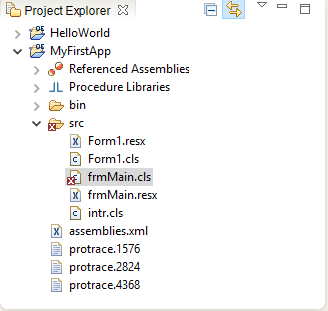
Hi! Everyone I am new in progress and I'm still studying this language. Can you help me on syntax of opening Form1.cls in Run time through frmMain.cls by clicking a button? Thank you.
Hi Arjon,
You'd need to add a button to frmMain.cls and then the code would be similar to below
METHOD PRIVATE VOID button1_Click( INPUT sender AS System.Object, INPUT e AS System.EventArgs ):

	DEFINE VARIABLE oForm AS Form1 NO-UNDO.

	oForm = NEW Form1().

        /* Show */
	/*oForm:Show().*/

	 /* Show as dialog */
	 WAIT-FOR oForm:ShowDialog().

  END METHOD.
You initialize the form and then show it either as a normal form or as a dialog.
Hope that helps
Hi Arjon,
You'd need to add a button to frmMain.cls and then the code would be similar to below
METHOD PRIVATE VOID button1_Click( INPUT sender AS System.Object, INPUT e AS System.EventArgs ):

	DEFINE VARIABLE oForm AS Form1 NO-UNDO.

	oForm = NEW Form1().

        /* Show */
	/*oForm:Show().*/

	 /* Show as dialog */
	 WAIT-FOR oForm:ShowDialog().

  END METHOD.
You initialize the form and then show it either as a normal form or as a dialog.
Hope that helps
Thank you Sir! I highly appreciate your help.